Problem
We have a GitLab group (MLOps) with several projects that build and publish private Python SDK packages to the GitLab Package Registry. These SDKs have third-party dependencies, and some depend on each other.
Python developers across different GitLab groups use these SDKs to build applications, which are packaged into Docker images.
The challenge: install private packages into a Docker image during CI without embedding credentials in the image, the Dockerfile, or the repository.
Attempt 1: Personal Access Token via ENV
The first approach uses a Personal Access Token (PAT) passed as environment variables.
requirements.txt:
-i https://${PYPI_TOKEN_NAME}:${PYPI_TOKEN_VALUE}@${CI_API_V4_URL}/groups/${MLOPS_GROUP_ID}/-/packages/pypi/simple/
SDK==1.0.0
Dockerfile:
FROM python:3.11-bookworm
WORKDIR /opt/app

ENV PYPI_TOKEN_NAME
ENV PYPI_TOKEN_VALUE
ENV CI_API_V4_URL
ENV MLOPS_GROUP_ID

COPY requirements.txt .
RUN pip install --no-cache-dir -r requirements.txt
COPY . .
CMD ["pytest", "--run-slow"]
.gitlab-ci.yml:
stages:
  - test

test:
  stage: test
  script:
    - docker build -f Dockerfile
        -e PYPI_TOKEN_NAME=$PYPI_TOKEN_NAME
        -e PYPI_TOKEN_VALUE=$PYPI_TOKEN_VALUE
        -e CI_API_V4_URL=$CI_API_V4_URL
        -e MLOPS_GROUP_ID=$MLOPS_GROUP_ID
        .
Problems:
- ENV variables persist inside the running container — credentials are exposed at runtime.
- PATs require manual rotation, expiration management, and permission scoping.
Attempt 2: Build ARGs instead of ENV
Replacing ENV with ARG removes variables from the final image layer.
Dockerfile:
FROM python:3.11-bookworm
WORKDIR /opt/app

ARG PYPI_TOKEN_NAME
ARG PYPI_TOKEN_VALUE
ARG CI_API_V4_URL
ARG MLOPS_GROUP_ID

COPY requirements.txt .
RUN pip install --no-cache-dir -r requirements.txt
COPY . .
CMD ["pytest", "--run-slow"]
.gitlab-ci.yml:
test:
  stage: test
  script:
    - docker build -f Dockerfile
        --build-arg PYPI_TOKEN_NAME=$PYPI_TOKEN_NAME
        --build-arg PYPI_TOKEN_VALUE=$PYPI_TOKEN_VALUE
        --build-arg CI_API_V4_URL=$CI_API_V4_URL
        --build-arg MLOPS_GROUP_ID=$MLOPS_GROUP_ID
        .
Better — ARGs don't survive into the running container. But they are still baked into the image's layer history. Anyone with access to the image can extract the token value:
$ docker history --no-trunc <image>

IMAGE          CREATED BY
...
<missing>      RUN |4 PYPI_TOKEN_VALUE=glpat-xxxxxxxxxxxxxxxxxxxx CI_API_V4_URL=https://gitlab.com/api/v4 ...
The full token is sitting there in plain text. Beyond that, PATs are still used and still need to be stored, rotated, and scoped manually.
What About netrc?
Another approach you'll find mentioned is writing credentials to a ~/.netrc file inside the image during the build:
RUN echo "machine gitlab.com login gitlab-ci-token password ${PYPI_TOKEN}" > ~/.netrc && \
    pip install -r requirements.txt && \
    rm ~/.netrc
The rm at the end looks like a cleanup, but it doesn't help — Docker commits each RUN step as a separate layer. The layer where .netrc was written still exists in the image and can be extracted with docker save. The file is gone from the final filesystem view, but not from the layer history.
You can work around this by squashing all three operations into a single RUN command (write, install, delete), so the file never appears in a committed layer. But at that point you're solving the same problem as BuildKit secrets, just with more ceremony and more room for error. BuildKit secrets are explicit, well-documented, and purpose-built for this — netrc is a workaround.
Solution: CI_JOB_TOKEN + Docker Build Secrets
The correct approach combines two things:
1. CI_JOB_TOKEN — a short-lived token GitLab generates automatically for each job, no management required.
2. Docker BuildKit secrets — mount credentials into a RUN step without baking them into any layer.
Step 1: Grant CI_JOB_TOKEN access to SDK projects
For each project that publishes a private package:
Settings → CI/CD → Job Token Permissions → Add group or project
Set Packages permission to Read, then click Add.
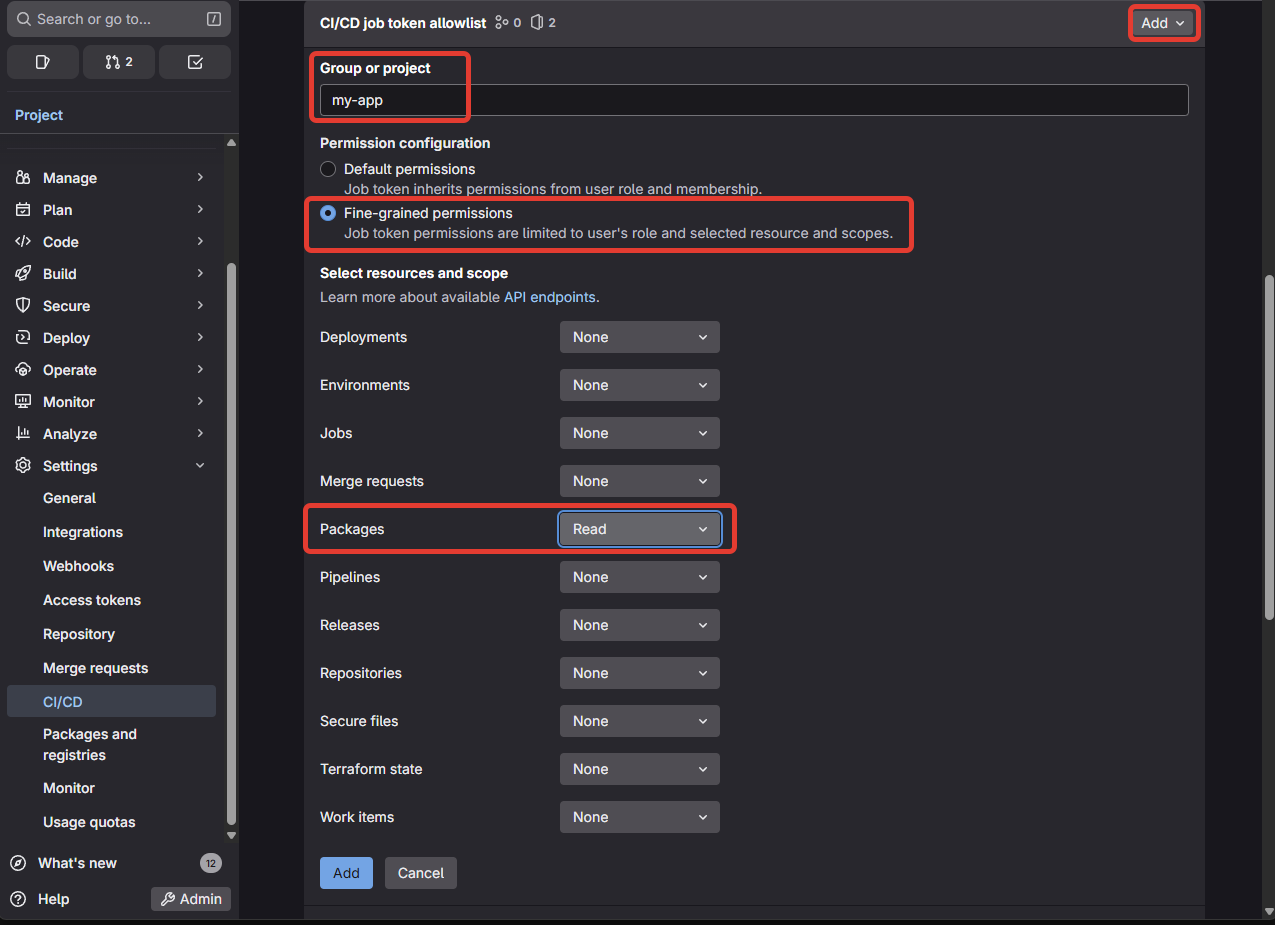
Repeat for every SDK project your application depends on.
Step 2: Update requirements.txt
Remove the index URL from requirements.txt — it moves into the Dockerfile where it belongs:
SDK==1.0.0
Step 3: Update the Dockerfile
Use the BuildKit --mount=type=secret directive to inject credentials only during the pip install step. They are never written to any image layer.
# syntax=docker/dockerfile:1
FROM python:3.11-slim-bookworm
WORKDIR /opt/app

RUN apt-get update && apt-get install -y cmake build-essential

COPY requirements.txt .

RUN --mount=type=secret,id=pypi_token \
    --mount=type=secret,id=ci_api_v4_url \
    --mount=type=secret,id=mlops_group_id \
    pip install \
      --no-cache-dir \
      --extra-index-url https://gitlab-ci-token:$(cat /run/secrets/pypi_token)@$(cat /run/secrets/ci_api_v4_url)/groups/$(cat /run/secrets/mlops_group_id)/-/packages/pypi/simple/ \
      -r requirements.txt

COPY . .
CMD ["pytest", "--run-slow"]
The # syntax=docker/dockerfile:1 directive enables BuildKit. Secrets are mounted as temporary files under /run/secrets/ and are gone after the RUN step completes.
A note on build cache: BuildKit does not cache secret values. If the RUN step is replayed from cache, the secret is re-mounted fresh from the current environment — it was never stored in the cache to begin with. There is no risk of a cached layer retaining a token from a previous build.
Step 4: Update .gitlab-ci.yml
Pass credentials as secrets, not build args:
stages:
  - test

test:
  stage: test
  script:
    - docker build -f Dockerfile
        --secret id=pypi_token,env=CI_JOB_TOKEN
        --secret id=ci_api_v4_url,env=CI_API_V4_URL
        --secret id=mlops_group_id,env=MLOPS_GROUP_ID
        .
CI_JOB_TOKEN is provided automatically by GitLab — no variable configuration needed.
Local Development
Developers can build locally by passing their own credentials:
docker build -f Dockerfile \
  --secret id=pypi_token,env=GITLAB_TOKEN \
  --secret id=ci_api_v4_url,env=CI_API_V4_URL \
  --secret id=mlops_group_id,env=MLOPS_GROUP_ID \
  .
Where GITLAB_TOKEN is a personal token with read_package_registry scope set in their local environment. The Dockerfile itself does not change.
Summary
| PAT via ENV | PAT via ARG | CI_JOB_TOKEN + Secret | |
|---|---|---|---|
| Credentials in image | ✅ yes | ❌ no (history leak) | ✅ no |
| Credentials in CI vars | ✅ yes | ✅ yes | ✅ no (auto-generated) |
| Token rotation needed | ✅ yes | ✅ yes | ✅ no |
| Local dev supported | ✅ yes | ✅ yes | ✅ yes |
BuildKit secrets are the right tool for this problem. The token never touches the image, never appears in layer history, and requires no maintenance.